6 Ways to Carry Cellphone When Hiking
Figuring out how to carry your cell phone when hiking should be simple, right? Well, not quite. There are a lot of ways to carry your phone on the trail. Not only that, but you also want to protect your phone while having easy access to it. While many hikers try to get away from technology, smartphones are often an invaluable tool for checking the weather, navigating, looking up trail guides, and emergency calls.
Here are 6 ways to carry your phone hiking:
1: Hip Pocket
Hip pockets are a standard feature on many larger hiking packs. What makes hip pockets so appealing is that they are right in front of you and are already attached to your pack. You don’t need to buy any additional gear.
A huge problem though is while hip pockets are the most convenient and accessible way to access smaller items, they are often too small for smartphones. Carrying a phone in a hip pocket is possible, but often you need to set your phone vertically sticking out. This might work if you have a deep pocket, but it allows the risk of your phone slipping out. You also have to be careful with this method if you are taking your pack off and on.
Some manufacturers have started creating external hip pocket attachments to add to your pack. While some of those attachable pockets are able to hold your phone, cell phones are getting larger and don’t always fit. After reading the reviews of the REI Co-op Packmod Hipbelt Pocket, you can see it can’t accommodate certain phones. If you do go with a pocket like this, make sure you find the dimensions of your phone first.
You may also like 7 Ways to Carry Your Tripod Hiking
2. Hip Belt / Running Belt
Hip belts are another option and are popular among runners. As such, a lot of these options on the market are snug, secure, and don’t bounce around. If you’re looking to carry your phone hiking as well as a few snacks, keys, and cash, these are great options.
One such belt is the Sport2People Running Pouch Belt. This running belt comes with generous room to hold your phone and other items. If you are using it for running, it even has reflective visibility and is water-resistant. I probably wouldn’t wear it in the pouring rain unless you had some extra waterproof protection.
3. Shoulder Pouch
Another convenient way to carry your cellphone hiking is by using the shoulder pouch. Most hiking packs don’t come with these, and if they do, they might be too small for a cellphone.
Similar to hip pockets, attachable shoulder pouches also exist. Shoulder pouches are good for quick access and they don’t get in the way. The downside is, if you are doing any fast pace hiking, these might bounce around a bit.
One of the very popular models is the Urvoix Phone Belt Pouch. This pouch comes in 3 sizes to hold even those larget phones. The Urvoix is rugged and waterproof, being constructed with military-grade straps. Not only can you fasten it to your shoulder strap, but also your belt.
You may also like Best Portable Bluetooth Speakers for Camping
4. Fanny Pack / Waist Pack
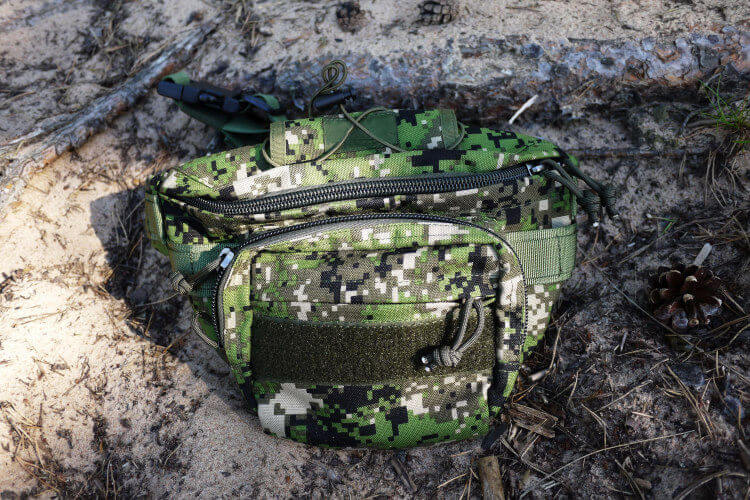
Come on, you didn’t think we were going to skimp on one of the most practical (and fashionable) accessories of all-time, did you? Not only is the fanny pack a status symbol, but you may find it more convenient than it’s cousin, the hip-belt.
And yes, there are even fanny packs designed specifically for hiking. Larger waist packs are often worn by hikers with shoulder issues. We even wrote an article about hiking without a backpack and backpack alternatives.
While waist packs can be convenient, they might not fit well while wearing a pack with a large hip belt.
Some popular models include the Patagonia Ultralight Black Hole Mini Hip Pack and the FREETOO Waist Pack. What’s good about both these types of packs is that they can be worn over the shoulder instead of the waist.
You may also like Can You Use a Mini Fridge for Camping? Here’s How…
5. Pants / Shirt Pockets
Though it might be more cumbersome, carrying your phone in your pocket when hiking is another option. Some hikers carry them in their pant pockets, while others carry them in their breast pocket. All these are options to try out.
Keep in mind, if you’re doing any technical hikes, hiking in bad weather, or are just a clumsy hiker, a pocket might not be the best place for your phone.
You might think cargo pants are an option, and they are. The risk is that the cell phone bounces around when you hiking and rubs against your leg. Still, it’s something worth trying out if you have a pair.
For the ladies, there are many tights and leggings too with side pockets. We even put together a list of the best hiking leggings with pockets. Our top pick on the list is the Fjallraven Abisko Trekking Tights, which was awarded the 2018 Backpacker Editors’ Choice Award.
6. In Your Pack
A simple solution for having to carry your cell phone on your person is to simply keep it in your pack.
While your phone is safest in your pack, it does lack the benefit of convenience. If you need to access your GPS, see the forecast, or make an emergency call, you will have to undo your pack and locate your device, which could be cumbersome if you want quick access.
You may also like How to Attach Sleeping Pad to Backpack
More Tips for Hiking With a Cellphone
Here are some more tips for carrying your cell phone on the trail:
- If you don’t plan on using your phone and are just using it for emergencies, keep your phone off. Phones that are constantly searching for nonexistent service drain the battery quickly.
- Wrapper your phone in a glove, tshirt, or another piece of clothing can help protect it. Just remember where it is when you go to take it out.
- Keep your phone in a waterproof bag or container. Not only for unexpected rain but also for river crossings. Ziplock bags are cheap and work great. If you want to get something more durable and waterproof, check out the JOTO Phone Dry Bag.
Which Method for Which Hike?
Different hikes call for different carry strategies. Here’s the short version:
- Short easy hikes: pants pocket. Simple, fast access.
- Photography-focused hikes: chest strap mount (Peak Design Capture, Ulanzi). Instant camera access.
- Running / fast-paced hikes: vest or armband — anything that doesn’t bounce.
- Wet weather: waterproof phone pouch (Aquapac, LifeProof case).
- Winter hikes: inside a base layer, against body heat — batteries die fast in the cold.
- Multi-day backpacking: hipbelt pocket on the pack. Accessible without stopping.
Protecting Your Phone from Sweat and Rain
Modern iPhones and Samsung flagships are IP68 rated, which helps but isn’t bulletproof. Protection layers that make a real difference:
- A ziplock bag. Free, zero weight, 99% effective for rain. The ultralight hiker’s answer.
- Waterproof pouch. Pelican, Aquapac, or NiteIze. Floats if dropped in a river; works in a downpour.
- Rugged case. OtterBox Defender, Spigen Tough Armor. Impact protection rather than waterproofing.
- Screen protector. Tempered glass saves the glass when the phone slips out of your hand at a scenic overlook.
- Wrist lanyard. Prevents the drop in the first place. Essential for summit photos over exposure.
Keeping the Battery Alive
Phone battery life drops fast on a hike. The main drains and fixes:
- Searching for signal. No bars = phone hunts continuously. Airplane mode saves 30–50% battery.
- GPS tracking. AllTrails, Gaia GPS. Kills battery in 4–6 hours. Use offline maps and low-power tracking mode.
- Cold. Below 32°F, batteries lose 30–50% capacity. Inside pocket against body heat solves this.
- Screen time. Taking photos and checking maps drains faster than ambient idle. Set screen brightness to 50%.
- Power bank. A 10,000 mAh pack weighs 7 oz and charges a modern phone twice. Worth the weight on any hike over 4 hours.
The Chest Mount: Why It’s Overlooked
A phone clip on your chest strap is underrated. Pros and cons:
- Pros: zero-effort access, hands stay on trekking poles, screen always visible for navigation, camera instantly ready.
- Cons: needs a backpack with a chest strap, possible phone-drop risk on scrambling, sweat contact.
- Best for: navigation-heavy hikes, photography hikes, family hikes with constant check-ins.
- Products: Peak Design Capture Clip ($70), Ulanzi Falcam ($25), Mountainsmith Tour FX ($40).
Hands-Free Options for Video and Photography
- Bike-style handlebar mount on trekking poles. Hacky but effective. Record POV video while hiking.
- Waist-belt clip. Holds a phone horizontally at hip level. Accessible without stopping.
- Clip to a baseball cap. Phone attached to the brim, screen up. Weird but works for dashcam-style video.
- Backpack shoulder-strap holster. A universal phone holster like the HIKENTURE or JINGUAN clip.
- GoPro-style chest strap. Holds the phone horizontally against your chest. Gimbal-like stability when walking.
What Not to Do
- Phone in back pocket when you sit down. Cracked screens. Always move it before sitting.
- Phone clipped to the outside of a pack. Branches, rocks, and pack shifts knock it off eventually.
- Loose in a top-loading pack pouch. Bounces inside, can fall out when opened.
- In a jacket pocket when river-crossing. One slip = phone underwater. Move to a waterproof pouch before crossings.
- In a shirt chest pocket without a button. Forward-bending is the #1 phone drop scenario.
Carrying Your Phone Hiking FAQ
Can I hike with my phone in my pocket?
For short hikes, yes — cargo pants or zipped side pockets work fine. For longer hikes, a chest mount or hipbelt pocket is more secure and accessible.
Do waterproof phone pouches work?
Yes — tested waterproof pouches (IPX7+) keep phones dry in downpours and brief immersion. Avoid cheap unbranded ones from marketplaces; they leak within a season.
Should I turn my phone off on a hike?
Airplane mode is better — keeps the phone available for emergencies, preserves battery, and lets offline GPS still work. Only turn off if you specifically want to disconnect.
What if I drop my phone on the trail?
A wrist lanyard ($8, Moft or Spigen) prevents 95% of drops. Modern flagships survive most hiking drops; older phones without tempered-glass screen protectors are more fragile.
What’s the best phone holster for hiking?
For camera + navigation focus: Peak Design Capture Clip. For running-pace hikes: Koala Clip or FlipBelt. For ultralight: a ziplock in your hipbelt pocket.